Procore and WBSync overlap on exactly one job — getting field labour hours onto cost codes — and differ on almost everything else, starting with scope.
Procore is sold as a construction-management platform: a family of products covering project management, financials, quality and safety, priced (in Procore's own words) "by product and based upon your Annual Construction Volume". Its labour tooling spans two areas. Field Productivity captures time — the My Time mobile app, Timecard, and crew Timesheets, with entries carrying a project, cost code, hours worked and billable status — and, when paired with the Project Financials product, feeds those hours into budget columns for cost tracking. Workforce planning arrived through the October 2021 acquisition of LaborChart, which became Procore Workforce Planning and was renamed Resource Planning in July 2025; it handles longer-range crew scheduling and assignments across projects.
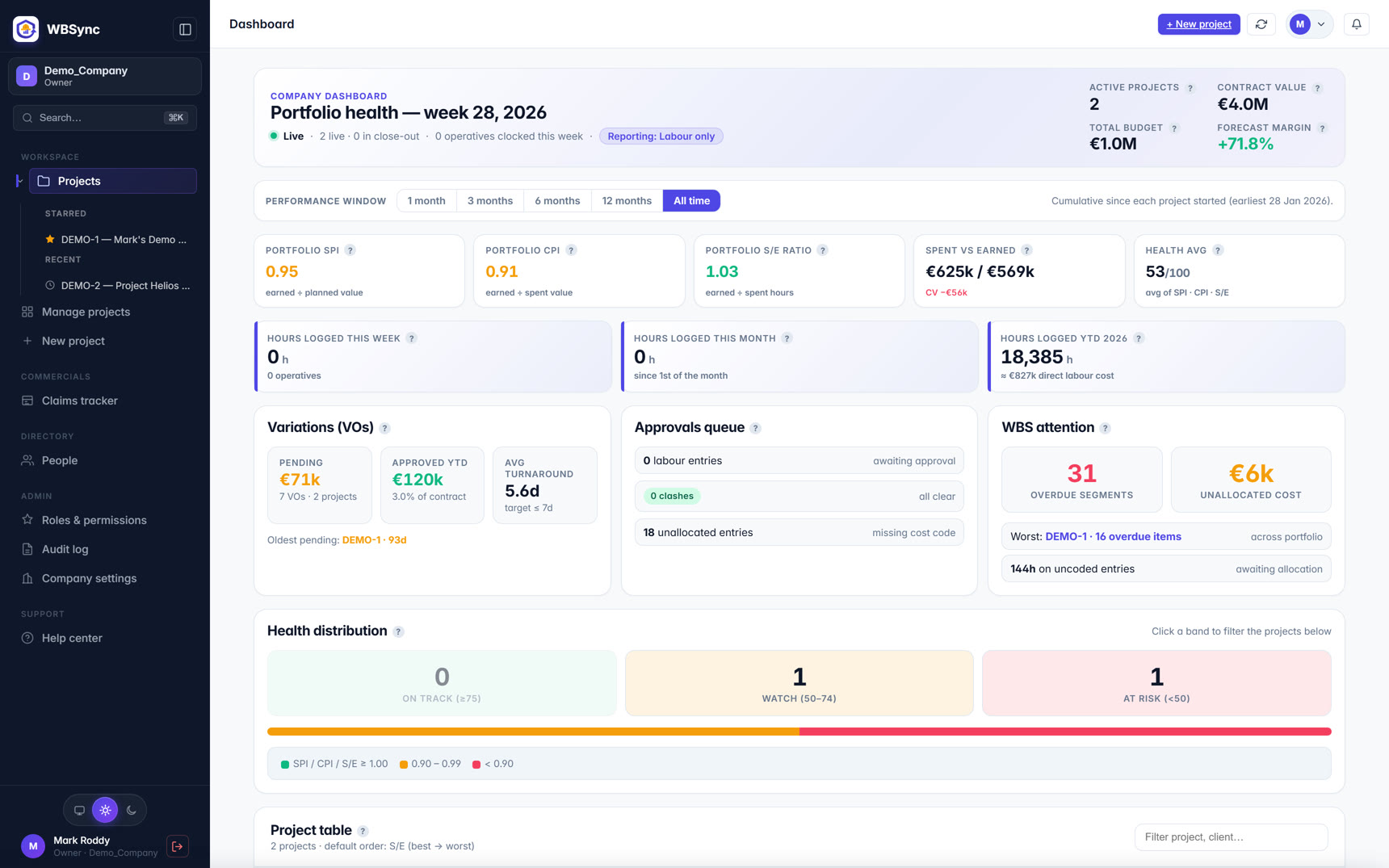
WBSync does one thing: labour tracking with earned-value management, done to the PMI / ISO 21508 conventions that quantity surveyors and project-controls teams expect. You import a four-level work-breakdown structure and BOQ from the spreadsheets you already have; hours arrive either from a foreman's mobile crew log (an offline-capable PWA — operatives never need logins) or automatically from your existing clock-in system through an open inbound API; and every approved hour lands on a cost code. From there the dashboards report spent-vs-earned, SPI, CPI, EAC and TCPI live, with S-curves per project and across the portfolio.
The buying experience differs as sharply as the scope. Procore quotes annually, per product, sized on your construction volume, with unlimited users included — there is no public price list, so budgeting starts with a sales conversation. WBSync publishes five flat-rate tiers (€249 to €4,999+ per month) priced by active operatives, with unlimited PM, foreman, QS and admin seats, and a 30-day self-service trial for up to 30 operatives.
That difference in shape is why this page is not a feature-count contest. If your organisation needs drawings, RFIs, submittals, daily logs and financials in one system of record, WBSync does not attempt any of that — Procore's breadth is the point of Procore. If the problem in front of you is that labour hours are collected in one place and priced in another, so your earned-value position is always a week old, a focused tool that integrates with what you already run may get you to a live SPI/CPI faster than a platform rollout. The sections below compare the two on that narrower question, with a source link on every factual claim about Procore, and a combined column showing what pairing them looks like.
Reviews at a glance
| Product | Public rating | In one line |
|---|---|---|
| Procore | 4.6 / 5 on G2 (4,182 reviews) [source] | Platform breadth praised; cost and learning curve are the recurring trade-offs in reviews. |
| Procore | 4.5 / 5 on Capterra (2,664 reviews) [source] | Sub-scores: ease of use 4.4, customer support 4.5, value for money 4.1. (Capterra, GetApp and Software Advice share one Gartner review pool.) |
| WBSync | No review-site listings yet | Launched 2026 — judge it on the 30-day free trial rather than star counts. |
Ratings are third-party review-site averages captured on 7 Jul 2026; they move as new reviews land. Always check the linked source for the current figure.
Where the typical setup breaks
On most self-perform sites the labour data pipeline looks like this: operatives clock through a time-clock app, the hours flow to payroll, and the cost codes live in a QS's spreadsheet. Someone re-keys hours against the WBS at the end of the week — so SPI and CPI, if they are computed at all, describe last week, and crewing decisions get made on gut feel in the meantime. The failure isn't any one product; it's the seam between systems: double data entry, drift between payroll hours and costed hours, and no approval step before bad punches contaminate the KPIs.
Procore closes that seam inside its platform when Field Productivity runs together with Project Financials and budget line items carry matching cost codes. WBSync closes the same seam from the opposite direction: it ingests punches from the clock system you already run, prices them against your imported WBS, and gates every hour behind a foreman/PM approval — with duplicate and over-cap clash checks — before it touches earned value.
Feature comparison
| Feature | WBSync | Procore | WBSync + Procore together |
|---|---|---|---|
| Product scope | Labour tracking + earned-value management on a 4-level WBS | Multi-product construction-management platform (PM, financials, quality & safety, workforce) [source] | Procore runs the project record; WBSync runs labour EVM |
| Earned-value metrics (SPI / CPI / EAC / TCPI) | Native, to PMI / ISO 21508 conventions, live on every dashboard | Not described in Procore's public product docs; earned value appears as an educational topic in its library [source] | WBSync supplies the EV layer on top of Procore's cost data |
| Field time capture | Foreman crew-log PWA, offline-capable; operatives need no logins | My Time, Timecard and Timesheets tools; offline-capable mobile timesheets with approval workflow [source] | Either front-end works — cost-coded hours can flow to both |
| Cost codes on hours | Every approved hour lands on a WBS cost code; clash checks + approval gate first | Timecard entries capture project, cost code, hours and billable status [source] | Shared cost-code discipline is what makes pairing work |
| Budget integration | Budgeted hours and value import with the WBS/BOQ; no extra module | Timesheet hours feed budget columns via the Project Financials product; budget lines must carry matching cost codes [source] | Procore holds the commercial budget; WBSync holds the labour performance baseline |
| Bring-your-own time clock | Open inbound clock API; prebuilt adapters for Deputy, ClockShark, QBTime, Connecteam, Hubstaff, Workflow Infinity | Third-party timecard entries supported via documented API endpoints (Create / Update Timecard Entry) [source] | One clock system can feed both via their APIs |
| Crew scheduling & dispatch | Daily plans and crew allocation per project; no long-range dispatch board | Resource Planning (formerly LaborChart, acquired October 2021) covers scheduling and assignments across projects [source] | Procore plans the workforce; WBSync measures what the plan earned |
| Pricing model | Published flat tiers €249–€4,999+/mo by active operatives; unlimited PM/foreman/QS seats | Custom annual quote, per product, based on Annual Construction Volume; unlimited users [source] | Two line items — WBSync's is public before you talk to anyone |
| How you buy | Self-service signup; 30-day free trial (up to 30 operatives); cancel anytime | Quote-driven sales process from the pricing page [source] | Trial WBSync while the Procore procurement cycle runs |
| Drawings, RFIs, daily log, field docs | Not included — deliberately out of scope | Part of the wider platform; Procore timecard entries post to the project's Daily Log [source] | Procore keeps this entirely |
Each Procore claim above links to a public source on their website. Spot a stale claim? Email hello@wb-sync.com and we'll correct it within 5 business days.
Earned value: the deciding question
If you shortlist these two products against each other, one question decides most evaluations: do you need SPI and CPI computed natively, live, to PMI / ISO 21508 conventions?
WBSync's answer is unambiguous — that is the product. Planned value comes from the imported WBS and BOQ, earned value from progress against cost codes, actual cost from approved hours priced at each worker's rate, and the dashboards derive SPI, CPI, EAC, ETC and TCPI continuously, with S-curves at every WBS level. An approval gate stands in front of all of it: hours only reach the KPIs after a foreman or PM approves them, and clash detection (duplicate submissions, over-cap days) blocks approval until someone resolves the conflict. That discipline is what keeps a live SPI trustworthy.
Procore's public documentation does not describe native SPI/CPI earned-value metrics. Its Field Productivity tools track timesheet hours against budgets and compare budgeted-versus-actual production quantities ("% Complete Production"), and its library covers earned-value analysis as an educational topic — methodology, not a named product feature. Third-party earned-value tools list Procore integrations, which is a reasonable route if you are committed to the platform. Procore's capabilities change frequently; verify the current state in your own demo.
Time capture and cost codes
Both products take field time capture seriously, in different shapes.
Procore offers My Time (individual mobile entry), Timecard (company level) and Timesheets (crew-based, project level). Entries capture project, cost code, hours worked and billable status; mobile timesheets work offline and sync when a connection returns; and a multi-tier approval workflow is available. Getting those hours into budget cost columns requires the Project Financials product, with budget line items set up to match the cost-code structure.
WBSync's field capture is a foreman-driven crew log: a progressive web app that works offline in its own right, where one foreman logs a whole crew's hours against cost codes in a couple of minutes — operatives never need accounts, which matters on sites where half the workforce changes monthly. Hours can also arrive with zero field-device involvement at all, via the clock-in integrations below. Every state change is audit-logged.
Keeping the clock system you already run
Neither product forces you to abandon an existing time clock, and this is worth dwelling on because it is the cheapest integration you will ever do.
Procore documents API endpoints (List Line Item Types, Create Timecard Entry, Update Timecard Entry) for pushing third-party timecard entries into its Timesheet Hours budget column, and time-clock vendors publish Procore marketplace integrations.
WBSync inverts the model: an open inbound clock API is the front door, not an add-on. Prebuilt adapters exist for Deputy, ClockShark, QBTime, Connecteam, Hubstaff and Workflow Infinity, plus a generic webhook for anything else that can POST a punch. The pitch is deliberate — WBSync integrates with clock systems rather than trying to be one.
What posts where: the system-of-record question
Switching fear usually comes down to "where does the truth live?" — so here is the honest split.
Procore, in a paired setup, remains the project record: drawings, RFIs, the Daily Log (Procore timecard entries post to it), budgets and commitments in Project Financials, and payroll exports to whatever payroll system you run today. WBSync holds the labour-performance layer: the WBS baseline, budgeted and earned hours and value, approvals, and the EVM reporting that goes into weekly progress reports and claims. Nothing in WBSync replaces payroll, and nothing in it competes with Procore's document tools. If you later leave either product, your data exports — WBSync ships XLSX and PDF exports of everything it holds.
Implementation, and what reviewers say
Procore publishes a five-phase implementation roadmap (account setup, launch, training and consultations, company rollout, continued success) without a stated end-to-end duration; its rollout guidance has users joining a test project two to three weeks before they are required to use the system, per project. Reviewers on the Gartner-network sites rate Procore strongly overall (4.5/5 across 2,664 reviews — note Capterra, GetApp and Software Advice share one review pool) with value-for-money the lowest sub-score at 4.1, and recurring review themes of cost on smaller firms, learning curve, and occasional performance complaints. G2 shows 4.6/5 across 4,182 reviews.
WBSync's setup is measured in days: import the WBS and BOQ from xlsx, invite foremen, connect the clock feed, and the first S-curve renders as soon as approved hours exist. There is no implementation contract because there is nothing to implement beyond that.
The honest case against WBSync
Balance matters, so: WBSync is new (launched 2026) and has no review-site track record — evaluate it on the trial, not on stars. It deliberately does not do drawings, RFIs, document control, estimating, or long-range workforce dispatch; if you need those from one vendor, WBSync alone will not get you there. And if your organisation already runs Procore wall-to-wall with Project Financials fully configured and cost-coded, the marginal gain from adding a dedicated EVM layer is something you should test in a trial project before committing — which the free tier of 30 operatives exists to let you do.
Implementation timeline
| System | Typical setup | What's involved |
|---|---|---|
| WBSync | Days | Import WBS + BOQ from xlsx, invite foremen, point your clock system at the inbound API. Self-service; no implementation contract. |
| Procore | Phased rollout; no published end-to-end duration [source] | Five-phase implementation roadmap (account setup, launch, training & consultations, company rollout, continued success); rollout guidance has users joining a test project 2–3 weeks before required usage, per project. |
| WBSync alongside Procore | Days | Keep Procore exactly as it is; feed the same cost-coded hours to WBSync via your clock vendor or an export. Nothing is ripped out. |
Who should choose what
| Choose | When |
|---|---|
| Procore | You need one platform for project management, drawings, RFIs, financials and field documentation across the business, and volume-based annual pricing fits your procurement process. |
| WBSync | Your problem is labour cost control: live SPI/CPI on real cost codes, an approval gate you can trust, your existing clock-in system kept, and pricing you can read today. |
| Both together | Procore runs documents and financials while WBSync supplies the earned-value layer, fed by the clock system you already use. |
| Neither (yet) | You run fewer than ~10 operatives and a disciplined spreadsheet still works. Revisit when re-keying hours starts costing more than software would. |
Pricing
WBSync publishes its full price list: five flat-rate tiers, each with unlimited back-office users, priced by active operatives rather than per seat — see the pricing page for current figures and what each tier includes. Every plan starts with a free 30-day trial (up to 30 operatives, no credit card). Procore's pricing model is covered in the comparison table above — where a vendor quotes custom pricing, budget for a sales process before you see a number.
Verdict — when to choose WBSync
WBSync is a better fit when the job in front of you is labour cost control: you want SPI and CPI computed live to PMI / ISO 21508 conventions on a real WBS, you want to keep the clock-in system you already run, and you want pricing you can read before talking to anyone. It suits self-perform and trade contractors from roughly 10 to 800+ operatives.
Procore is a better fit when you need one platform for the whole project record — drawings, RFIs, daily logs, financials, quality and safety — and volume-based annual pricing fits your procurement. Its workforce tools are strongest where scheduling and dispatch across many projects matter.
Running both is a legitimate answer: Procore keeps the project record, WBSync supplies the earned-value layer, and cost-coded hours flow between them through the APIs both vendors document. Start the WBSync trial on one live project and compare its SPI against your current Friday spreadsheet — that test costs nothing and settles the question with your own data.
FAQ
Does WBSync replace Procore?
Not like-for-like. WBSync replaces the labour-tracking spreadsheet and adds PMI/ISO 21508 earned-value management; it does not do drawings, RFIs, financials or document control. Teams that need those keep Procore (or an equivalent) alongside WBSync.
Does Procore report SPI and CPI natively?
Procore's public documentation does not describe native SPI/CPI earned-value metrics; its library covers earned-value analysis as methodology, and third-party EVM tools list Procore integrations. Capabilities change frequently — verify in your own Procore demo.
Can I keep my existing time-clock with either product?
Yes, on both sides. Procore documents API endpoints for third-party timecard entries (Create / Update Timecard Entry). WBSync's inbound clock API has prebuilt adapters for Deputy, ClockShark, QBTime, Connecteam, Hubstaff and Workflow Infinity, plus a generic webhook for anything that can POST a punch.
How much does Procore cost?
Procore doesn't publish prices. Its pricing page describes an upfront annual fee per product, sized on your Annual Construction Volume, with unlimited users included. Reviewers on the Gartner-network sites rate its value for money 4.1/5 and frequently cite cost as the main trade-off for smaller firms.
How long does WBSync take to set up?
Days, not months. Import your WBS and BOQ from the spreadsheets you already have, invite foremen, and connect your clock system to the inbound API. The 30-day free trial (up to 30 operatives, no credit card) is the fastest way to see your own data in it.
Is WBSync's earned value PMI-compliant?
Yes. SPI, CPI, EAC, ETC and TCPI follow PMI / ISO 21508 conventions, computed on approved hours only, with S-curves at every level of a four-level WBS.
Sources
Every factual claim about Procore on this page is drawn from publicly available information on their own website, documentation, or pricing pages, captured on 7 Jul 2026.
- Procore pricing (official)
- Procore Workforce Management (official)
- Procore Timecard (official)
- Procore Timesheets documentation
- Procore Field Productivity + Project Financials setup guide
- Procore Resource Planning (formerly LaborChart) documentation
- Procore press release — LaborChart acquisition (Oct 2021)
- Procore library — earned value analysis (educational article)
- Procore implementation roadmap
- Procore rollout strategy guidance
- Procore FAQ — third-party timecard entries via API
- Procore reviews on Capterra (4.5/5, 2,664 reviews, pulled 7 Jul 2026)
- Procore reviews on GetApp (4.5/5, shared Gartner dataset)
- Procore reviews on Software Advice (4.5/5, shared Gartner dataset)
- Procore reviews on G2 (4.6/5, 4,182 reviews, pulled 7 Jul 2026 via the AWS Marketplace G2 embed)